



Why connect SAP to Yooz?
Connecting SAP to Yooz helps structure what is often a fragmented process: from invoice receipt to checks, approvals, posting and payment tracking. The native integration ensures critical information flows between Yooz and SAP at every stage of the cycle.


How does the integration work?
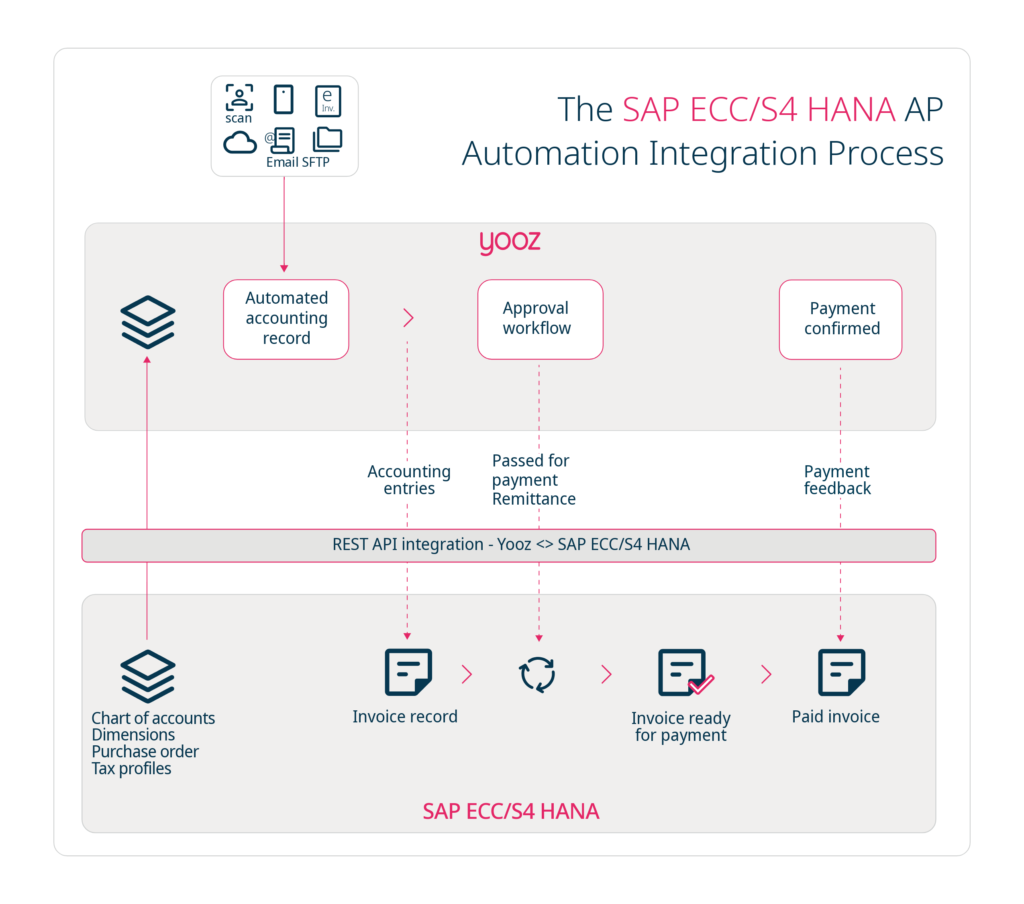
Yooz takes charge of invoice processing and orchestrates the workflow, while SAP receives accounting entries and supports payment tracking. The integration is driven by clear invoice statuses – blocked, approved for payment, paid – managed through automated exchanges between both systems.
Connectivity & interfaces
For both SAP Business One and SAP ECC / S4HANA, an API-based integration between Yooz and SAP enables bi-directional data flows and real-time updates, ensuring consistent synchronisation of financial and purchasing data.

SAP Resources


What SAP Users Say About Yooz – USF Conference Interviews

Personalized demo
Discover Yooz, the smartest, most powerful, and easiest-to-use solution!
FAQ SAP and Yooz
Is the integration between Yooz and SAP native?
Yes, Yooz offers native integration for both SAP Business One and SAP ECC / S4HANA with dedicated interfaces and bi-directional data exchange.
Which versions of SAP are supported?
Yooz integrates with SAP Business One and SAP ECC / S4HANA.
What types of data can be synchronised between Yooz and SAP?
Master data like a chart of accounts, dimensions, purchase orders and tax profiles, as well as transactional invoice data including accounting entries, ‘approved for payment’ status and payment updates can be synchronised between Yooz and SAP.
How are purchase order invoices handled?
Yooz matches invoices with POs and, depending on your SAP setup, may incorporate receipt information for full three-way matching.
Can I track the invoice processing status?
Yes, you can view statuses from ‘blocked’ to ‘approved’ and finally ‘paid’, with updates from SAP.
How are ‘approved for payment’ and payment steps managed?
Yooz sends ‘approved for payment’ details to SAP and receives payment feedback to reflect updated statuses.
Are accounting entries transferred to SAP?
Yes, Yooz automatically sends accounting entries to SAP as part of the integration.
Does Yooz support approval workflows before export to SAP?
Absolutely, approval workflows are built in, to validate invoices before sending entries and ‘approved for payment’ statuses to SAP.
Explore other ERP integrations

Sage

Microsoft MS Dynamics

Oracle NetSuite

Infor

Acumatica
