



- Invoice automation uses software to receive, extract, check, match, approve and post supplier invoices, so finance teams only step in on exceptions.
- It complements e-invoicing rather than replacing it: e-invoicing changes how invoice data arrives, while automation handles everything that happens next.
- From April 2029, e-invoicing becomes mandatory for VAT invoices in UK B2B and B2G transactions, with Peppol as the core network. Further technical specifications are still being developed, but AP processes will need to handle structured e-invoices alongside PDFs.
- Key capabilities to look for: AI-powered Smart Data Extraction, 2- and 3-way matching, flexible approval workflows, fraud controls and invoice data that syncs with your ERP or accounting system.
- Yooz is used by more than 7,000 customers in 50+ countries, connects to 250+ ERP and financial systems and already has experience operating as a certified Peppol Access Point in European markets.
By replacing manual data entry, invoice matching, approval chasing and document handling with automated workflows, businesses can process invoices faster, strengthen financial control and give finance teams access to more reliable, real-time information.
But invoice automation is also evolving. From April 2029, structured e-invoicing will become mandatory for VAT invoices in the UK, changing the way invoice data is exchanged between businesses.
At the same time, finance teams may still need to manage invoices that fall outside the UK mandate or originate from markets with different requirements and formats. Invoice automation solutions therefore need to be able to support structured e-invoices alongside other invoice formats within the same AP process.
This guide explains how invoice automation works, the benefits it can deliver and what organisations should look for when choosing a solution.
What is invoice automation?
Invoice automation is the use of technology to automate the receipt, processing, control, approval and accounting of supplier invoices.
Instead of relying on employees to manually open invoices, enter data, match documents, identify discrepancies and chase approvers, an automated system handles much of this process according to predefined controls and workflows.
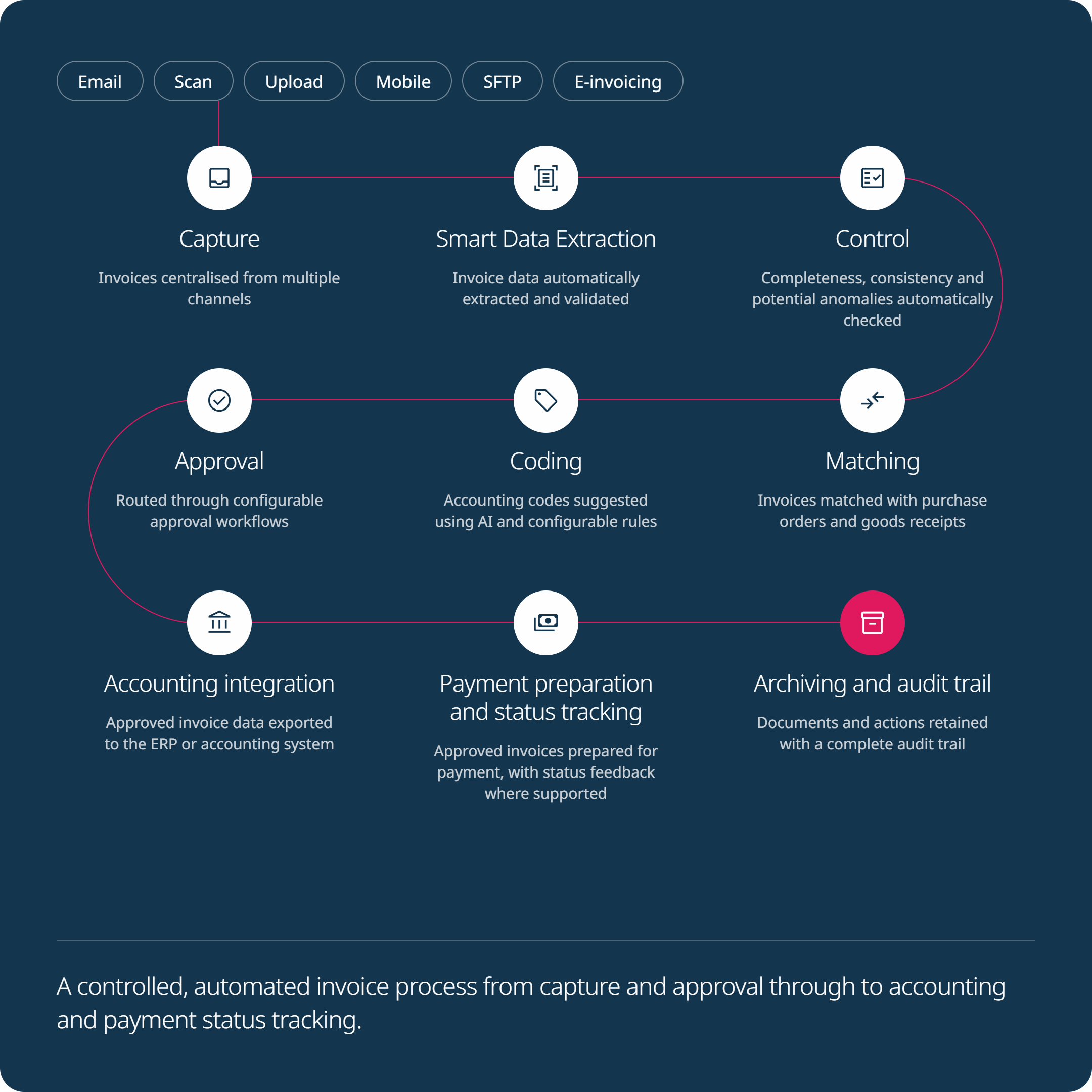
A typical automated invoice process includes:
- Capture: invoices are received through channels such as email, scan, upload, SFTP or e-invoicing networks and centralised within the same environment.
- Data extraction: relevant invoice information, including supplier details, invoice numbers, dates, VAT and amounts, is automatically identified and converted into usable data.
- Control: invoice data is checked for completeness, consistency and potential anomalies.
- Matching: invoices can be automatically reconciled with purchase orders and goods receipts.
- Coding: accounting and analytical data can be automatically assigned according to predefined rules and previous processing patterns.
- Approval: invoices (including any exceptions) are routed to the appropriate users according to the organisation’s approval policies.
- Accounting integration: invoice data is transferred to the organisation’s ERP or accounting system.
- Payment preparation and tracking: approved invoice data can be passed to the relevant financial system for payment processing, while payment status can be returned and tracked within the invoice workflow.
- Archiving and audit trail: documents and processing information are securely retained and remain accessible for control and audit purposes.
The objective is not simply to turn paper invoices into digital documents. It is to create a controlled flow in which invoice data can move from receipt to accounting with as little unnecessary manual intervention as possible.
Invoice automation and e-invoicing: What is the difference?
Invoice automation and electronic invoicing can be connected, but they are not the same thing.
Invoice automation refers to the processes used internally to capture, control, match, approve and account for invoices.
E-invoicing, by contrast, concerns the way invoice data is created, transmitted and received between organisations. A true e-invoice contains structured, machine-readable data that can pass directly from one system to another without requiring information to be extracted from a PDF.
The two are complementary. Because e-invoicing provides structured, machine-readable data from the outset, it can make invoice automation more reliable and efficient by reducing the need to extract and interpret information from documents such as PDFs.
From April 2029, e-invoicing will become mandatory for VAT invoices in B2B and B2G transactions. The UK government has selected Peppol as the core interoperability network for the future regime, although further standards, technical specifications and implementation details are still being developed.
For finance teams, the shift to e-invoicing changes how invoices enter the process, but not what needs to happen next. Whether an invoice arrives as a PDF or as structured data, it still needs to be checked, matched, approved and transferred to the accounting system.
This means businesses should look for solutions that can handle both traditional and structured invoices within the same process, while automating the controls and workflows that follow receipt.
Webinar Replay – 2029 UK e-invoicing mandate: Get ahead today with Yooz, the most advanced AI-powered P2P automation solution, already operating on PEPPOL
Ready to see how only Yooz delivers the intelligence, flexibility and control needed to transform e-invoicing compliance into a strategic advantage?

Automating e-invoice receipt, validation and routing
From April 2029, e-invoicing will become mandatory for VAT invoices in UK B2B and B2G transactions, with Peppol selected as the core interoperability network. Further technical specifications and implementation details are still being developed, but a growing share of supplier invoices will arrive as structured data.
Receiving them is only the first step. Every e-invoice still needs to be validated, routed to the right people and posted to the accounting system. Automating this e-invoice receiving process allows AP teams to handle structured e-invoices, PDFs and paper invoices within a single workflow, rather than running a separate process for each format.
Automating the e-invoice receiving process
An automated receiving process collects invoices from every channel in one place: e-invoices received through Peppol, alongside PDFs sent by email, uploaded files, scans and SFTP transfers. Structured e-invoice data is ingested directly, while PDFs and scans are processed using AI-powered Smart Data Extraction. Each invoice then enters a controlled and traceable process, where it can be associated with the corresponding supplier record and routed for further processing.
How do UK businesses automate the validation and routing of digital invoices?
Validation relies on automated checks applied as invoices enter the process:
- Mandatory fields, invoice numbers and dates are present and consistent
- VAT amounts and rates pass the configured consistency checks
- Supplier details and, where configured, bank details can be checked against available master data
- Potential duplicate invoices are identified
- For PO-based invoices, prices and quantities can be matched against purchase orders and goods receipts using configured tolerances
Invoices that meet the configured rules can continue automatically. Exceptions are flagged with the reason for review, helping the appropriate person resolve them quickly.
Routing then sends each invoice to the appropriate approvers according to configurable rules based on criteria such as value, legal entity, department, cost centre, supplier or exception type. Automated reminders and escalations help keep invoices moving, while segregation of duties and a complete audit trail support control throughout the process.
Invoice automation that integrates with your accounting system
Validation and routing are most effective when they use up-to-date reference data. That is why invoice automation should integrate with your ERP or accounting system, with bidirectional data synchronisation where supported by the relevant connector.
Depending on the ERP and connector, available reference data may include supplier master data, charts of accounts, analytical dimensions, tax codes and purchase orders. Approved invoice data and accounting entries can then be transferred to the accounting environment, while payment status feedback can be returned to the invoice workflow where supported. The ERP remains the system of record, reducing the need for manual data rekeying.
Yooz connects with more than 250 ERP and finance systems, including Sage, Microsoft Dynamics, Oracle NetSuite, SAP and Infor. Yooz is also a certified Peppol Access Point in European markets including France and Belgium, and is preparing to extend this connectivity to support the UK framework as it is defined. Together, these capabilities allow UK finance teams to automate invoice receipt, validation and routing today while preparing for the April 2029 mandate.
What are the benefits of invoice automation?
1. Faster invoice processing
Manual processing creates waiting time at almost every stage: invoices sit in inboxes, data has to be entered, purchase orders must be located and approvers need to be contacted.
Automation removes many of these hand-offs.
Invoices can be captured as soon as they arrive, automatically matched against supporting documents and immediately routed to the appropriate person when human intervention is required.
Invoices that meet predefined rules can progress with minimal or even no manual intervention, while finance teams concentrate on genuine exceptions.
2. Greater visibility and control
Manual and fragmented processes make it difficult to answer basic questions:
Where is an invoice? Has it been approved? Why is it blocked? Has it been posted? Is a duplicate already in the system?
Centralising invoice processing provides finance teams with real-time visibility over each document and its status.
This improves day-to-day operational control while giving finance leaders more reliable information for monitoring spend, managing cash flow and identifying bottlenecks.
3. Fewer errors and discrepancies
Manual data entry inevitably introduces a risk of error.
Automated data extraction eliminates much of this rekeying, while automated controls can check invoice information against supplier records, purchase orders, goods receipts and predefined business rules.
Rather than relying on an employee to detect every discrepancy, exceptions can be identified systematically and escalated for review.
4. Stronger protection against fraud
Invoice fraud does not occur at a single point in the process. Risks can arise from fraudulent documents, changes to supplier information, duplicate invoices, abnormal amounts or weaknesses in approval procedures.
Invoice automation allows organisations to apply controls systematically throughout the workflow.
Automated checks, separation of duties, approval rules, duplicate detection, anomaly identification and detailed audit trails can all help strengthen the control environment and make suspicious transactions easier to identify before they progress.
5. More time for higher-value finance work
When AP teams spend large amounts of their working day capturing data, locating documents, reconciling invoices and chasing approvals, there is less time available for analysis and decision support.
Automation changes the nature of the workload.
Teams can focus more attention on exceptions, supplier relationships, cash management, internal control and performance analysis rather than repetitive invoice administration.
Essential features of an invoice automation solution
The benefits of automation depend heavily on the capabilities of the technology behind it.
When assessing invoice automation software, organisations should consider several core capabilities.
Intelligent invoice capture and data extraction
Invoices can arrive through many different channels and in different formats.
An automation solution therefore needs to capture these documents centrally before accurately identifying information such as:
- Supplier details
- Invoice and purchase order numbers
- Invoice dates
- Line items
- VAT information
- Accounting information
- Invoice totals
Traditional Optical Character Recognition (OCR) converts the contents of a document into machine-readable text. More advanced solutions combine OCR with Artificial Intelligence and Machine Learning to understand invoice content and identify the relevant information automatically.
This enables invoice processing to begin immediately without requiring finance teams to manually enter the same information into another system.
2-way and 3-way matching
Automated matching is particularly valuable for purchase-order-based invoices.
With 2-way matching, the system compares the invoice against the corresponding purchase order.
With 3-way matching, it also compares the invoice with the goods receipt or other evidence of delivery.
| Document | 2-way matching | 3-way matching |
|---|---|---|
| Purchase order | ✅ | ✅ |
| Invoice | ✅ | ✅ |
| Goods receipt | ❌ | ✅ |
Tolerance rules can determine which discrepancies require intervention.
An invoice that matches the required criteria can therefore continue through the process automatically, while an invoice with a price, quantity or delivery discrepancy is routed to the relevant person for review.
Flexible approval workflows
Not every invoice should follow the same approval route.
Approval requirements may depend on factors such as:
- Invoice value
- Supplier
- Legal entity
- Department
- Cost centre
- Purchase type
- Project
- The nature of an exception
An innovative invoice automation solution should allow organisations to create dynamic workflows reflecting their existing policies and internal controls.
Automated reminders and escalations can also prevent invoices from remaining indefinitely with an approver.
ERP and accounting system integration
Automation should not create another isolated finance system.
Invoice data must ultimately interact with the organisation’s ERP or accounting environment, including information such as supplier master data, charts of accounts, analytical dimensions, purchase orders, tax codes and invoice statuses.
Strong integration allows information to move between systems without repeated manual entry while maintaining the ERP or accounting platform as the appropriate system of record.
Multi-format and e-invoicing capabilities
The invoice landscape is becoming increasingly heterogeneous.
Finance teams may simultaneously receive PDFs, scanned documents and structured electronic invoices such as UBL or other XML-based formats.
The gradual adoption of e-invoicing, including the UK’s planned 2029 mandate, makes the ability to manage structured invoice data increasingly important.
Organisations should therefore consider whether a solution can centralise and process invoices regardless of their source or format, rather than creating separate workflows for each channel.
Fraud prevention and auditability
Security should be built into the invoice workflow rather than added as a final check.
Relevant capabilities include:
- Duplicate invoice detection
- Supplier and bank detail controls
- Anomaly detection
- Segregation of duties
- Configurable approval rights
- Traceability of changes and approvals
- A complete audit trail
Together, these controls make it easier to identify suspicious activity while providing evidence of how every invoice has been processed.
Supplier statement reconciliation
Supplier statement reconciliation is another activity that can consume significant AP resources when performed manually.
Automation can compare supplier statements against invoices and accounting information to identify missing invoices, discrepancies and outstanding items.
This helps finance teams address issues earlier while reducing the time spent manually reconciling large numbers of transactions.
Reporting and real-time visibility
By centralising invoice processing in one system, automation gives finance teams a clearer view of what is happening across the AP process.
They can see which invoices are waiting for approval, where delays are occurring, which invoices are blocked and how long processing is taking.
This makes it easier to identify bottlenecks, follow up on issues and monitor AP performance without having to compile the information manually.
Whitepaper – 5 transformations already implemented by the highest-performing finance departments
This white paper documents five transformations already implemented by the most advanced organisations – practical changes that reshape finance processes and can be put into action today.

Best practices for successful invoice automation
Technology alone will not solve an inefficient Accounts Payable process. Successful automation begins by understanding the process that needs to be improved.
1. Map the existing process
Start by identifying how invoices currently enter the organisation and what happens to them afterwards.
Look for:
- Manual data entry
- Duplicated tasks
- Email-based approvals
- Missing purchase orders
- Recurring exceptions
- Approval bottlenecks
- Manual reconciliations
- Gaps in visibility
This makes it possible to distinguish problems that automation can eliminate from those that require changes to internal processes.
2. Define what success looks like
Organisations should decide which improvements they expect from automation.
Objectives might include:
- Reducing manual invoice handling
- Accelerating approvals
- Increasing PO matching rates
- Improving visibility
- Reducing exceptions
- Strengthening fraud controls
- Standardising processes across several entities
Clearly defined objectives also make it easier to measure the impact of the project after implementation.
3. Choose a solution that integrates with the wider finance environment
Invoice automation should be assessed within the wider purchasing and finance ecosystem.
This includes existing ERP and accounting systems, procurement processes, supplier data, approval policies, e-invoicing requirements and reporting needs.
A platform capable of supporting these processes within a connected environment can help organisations avoid replacing one fragmented process with another.
4. Configure controls and exception rules
The objective of automation is not to remove every human decision.
It is to automate predictable transactions while directing people towards situations where their judgement is genuinely required.
Matching tolerances, approval thresholds, accounting rules and exception workflows should therefore be configured to reflect the organisation’s own control framework.
5. Test representative scenarios
Testing should cover more than a handful of straightforward invoices.
Organisations should include different suppliers, entities, invoice formats, PO and non-PO invoices, credit notes, discrepancies and approval routes.
This helps ensure that the process works not only for standard invoices but also for the exceptions finance teams encounter in practice.
6. Monitor performance after implementation
Automation should provide measurable operational improvements.
Monitoring indicators such as touchless processing rates, approval times, exception volumes and processing bottlenecks can help finance teams identify opportunities for further optimisation.
7. Support user adoption
A technically effective system will still fall short if employees do not understand how or why they should use it.
Users should understand the new workflows, their responsibilities and the benefits the new process brings to their daily work.
The easier the system is to use, the easier it becomes to embed automation into day-to-day operations.
How Allianz Trade Optimises AP Processes with Yooz
Why Yooz for Invoice Automation?
Yooz goes beyond automating individual invoice-processing tasks by providing a single cloud platform designed to automate, standardise and secure the wider Purchase-to-Pay process. Its AI-powered Smart Data Extraction technology captures and understands invoice data across multiple channels and formats, while automated coding, 2- and 3-way matching, intelligent approval workflows, fraud controls, supplier statement reconciliation and real-time reporting help minimise manual intervention and focus finance teams on exceptions. Yooz also extends automation upstream into purchase requests, purchase orders, goods receipts and budget control, enabling organisations to connect invoice processing with the decisions that generate spend in the first place.
Rather than replacing the organisation’s financial system, Yooz connects to it. With 250+ integrations with ERP and financial management systems, the platform is designed to exchange the data required throughout the process while maintaining continuity with organisations’ existing technology environments. Yooz can also manage traditional invoice channels alongside structured electronic invoices, providing a scalable foundation as e-invoicing requirements continue to develop internationally.
In addition to its country-specific e-invoicing capabilities, Yooz is used by more than 7,000 customers across 50+ countries for the wider P2P and O2C workflows, with 300 million documents already having been processed through the platform. By combining automation, integration, security, e-invoicing capabilities and Purchase-to-Pay functionality within the same environment, Yooz enables finance teams to move beyond simply processing invoices faster and towards greater operational control across the entire process.


Personalized demo
Discover Yooz, the smartest, most powerful, and easiest-to-use solution!
Frequently asked questions about invoice automation
What is invoice automation?
Invoice automation uses software to automate tasks involved in processing supplier invoices, including capture, data extraction, control, matching, approval, accounting integration and archiving. It reduces the amount of manual handling required throughout the Accounts Payable process.
How does automated invoice processing work?
Invoices are first captured from channels such as email, upload, scan, SFTP or an e-invoicing network. The system extracts or receives the invoice data, verifies it and can match it against purchase orders and goods receipts. Based on predefined rules, the invoice can then be automatically processed or routed to the appropriate user for approval or exception handling before being transferred to the accounting or ERP system.
How does invoice automation work step by step?
Most invoice automation workflows follow seven steps:
- Receive: invoices arrive by email, upload, scan, SFTP or an e-invoicing network such as Peppol, and are centralised in one place.
- Capture the data: structured e-invoice data is ingested directly, while PDFs and scans are processed using AI-powered Smart Data Extraction.
- Validate: invoice data is checked for completeness, VAT consistency, duplicates and supplier details.
- Match: PO-based invoices are matched against purchase orders and goods receipts (2- or 3-way matching), within defined tolerances.
- Code: accounting and analytical codes are suggested or assigned automatically.
- Approve: invoices and exceptions are routed to the right approvers, with automated reminders and escalations.
- Post and archive: approved invoices are transferred to the ERP or accounting system, payment status is returned and tracked where supported, and documents are archived with a full audit trail.
How long does it take to implement invoice automation?
Implementation time depends on four main factors: the number of entities, the ERP environment, the integrations required and the complexity of your approval and matching workflows.
A single entity with a standard ERP connector and simple approval rules requires less configuration than a multi-entity group with PO matching, bespoke workflows or custom integrations. Larger projects may therefore be rolled out in phases, for example starting with invoice capture and approvals before adding 3-way matching or e-invoicing. A precise timeline is best defined during project scoping.
Using existing connectors for your ERP also reduces integration effort. Yooz offers more than 250.
What is the difference between invoice automation and e-invoicing?
E-invoicing concerns the electronic exchange of structured invoice data between suppliers and buyers. Invoice automation concerns what happens to the invoice within the organisation, including control, matching, approvals and accounting.
The two complement each other: structured e-invoicing can remove the need to extract information from a document, while invoice automation determines how that information is processed afterwards.
Will e-invoicing replace invoice automation?
No. E-invoicing automates the exchange of invoice data, but organisations will still need to control what happens after an invoice is received.
Invoices may still need to be matched with purchase orders, checked against business rules, assigned accounting information, approved, transferred to an ERP and monitored through to the next stage of the process.
When will e-invoicing become mandatory in the UK?
The UK government has announced that e-invoicing will become mandatory for VAT invoices in B2B and B2G transactions from April 2029.
Peppol has been selected as the core interoperability network for the future regime. Further legislation, technical specifications and detailed guidance are being developed ahead of implementation.
Can invoice automation integrate with my existing ERP?
Yes, provided the automation platform supports the required integration.
Integration allows information such as suppliers, purchase orders, accounting codes, analytical dimensions, invoices and processing statuses to move between the invoice automation platform and the ERP without repeated manual entry.
Yooz integrates with more than 250 financial management and ERP systems, including platforms from Sage, Microsoft, Oracle NetSuite, SAP, Infor and others.
Can non-PO invoices be automated?
Yes.
Purchase-order invoices can usually be automated through 2- or 3-way matching, while non-PO invoices can follow different rules. For example, accounting information can be automatically suggested or assigned before the invoice is routed through the appropriate approval workflow.
What is touchless invoice processing?
Touchless invoice processing refers to invoices that can move through all or most of the workflow without manual intervention.
For example, an invoice may be automatically captured, recognised, matched with a purchase order and goods receipt, coded and processed according to predefined rules. Human intervention is then reserved for invoices containing discrepancies or other exceptions.
How does invoice automation help prevent fraud?
Invoice automation makes it possible to apply controls systematically rather than relying solely on manual checks.
Depending on the solution, these controls can include duplicate detection, supplier and bank detail verification, anomaly detection, document controls, approval thresholds, segregation of duties and detailed audit trails.
Automation can significantly strengthen the organisation’s ability to identify unusual or non-compliant transactions.
Is invoice automation only suitable for large companies?
No.
The value of automation depends more on invoice volumes, process complexity and the amount of manual work involved than on company size alone.
Growing businesses can use automation to avoid increasing administrative workload as invoice volumes rise, while larger or multi-entity organisations can use it to standardise workflows and strengthen visibility across more complex environments.
Additional Resources
3-way matching in Accounts Payable

Accounts Payable Automation Using Sage 50


Acing the Accounts Payable Payment Process