



Why connect Sage to Yooz?
Connecting Sage to Yooz allows organisations to industrialise what is often a fragmented process: invoice receipt, controls, approval, accounting entry and payment tracking. The integration ensures structured and automated data circulation between Yooz and Sage throughout the lifecycle. It enables you to:


The objective is simple: remove manual rekeying, reduce uncertainty and increase operational visibility.
How the integration works
Yooz orchestrates invoice processing while Sage records financial entries and executes payments.
The structured exchange between both systems ensures a clear lifecycle: invoice received → verified → approved → posted → paid.
1. Data synchronisation
Depending on your Sage environment, Yooz synchronises available master data to automate coding and controls from the moment the invoice is captured.
Synchronised data may include:
- Chart of accounts
- Dimensions
- Suppliers
- Tax codes
- Purchase orders (when available)
- Goods receipts (for environments supporting 3-way matching)
The level of synchronisation varies by Sage version and connector.
2. Capture and processing in Yooz
Invoices are collected via multiple channels: Email, scan, supplier portal upload, electronic feeds, SFTP.
Yooz:
- Extracts invoice data using AI and Machine Learning
- Proposes automated accounting coding
- Launches configurable approval workflows
- Manages exceptions and discrepancies
- Provides full traceability and an audit trail
Human intervention is focused on exceptions, not manual data entry.
3. Data transmission to Sage
The transmission mechanism depends on the Sage product in place.
- For Sage Intacct
Integration is API-based with real-time synchronisation of master data and automatic posting of approved invoices.
Approved invoices and journals are transmitted directly into Intacct with structured dimensional data, including the original invoice PDF attachment.
The integration also supports remittance export, enabling payment information to be structured and exchanged as part of the process, ensuring full visibility from invoice approval through to payment.
- For Sage X3 (Acuity / Deveho integrations)
The integration supports structured export of accounting entries from approved invoices and PO-matched invoices into Sage X3. Where applicable, 3-way matching (PO / receipt / invoice) is supported depending on the Sage X3 configuration.
Data exchanges are managed via dedicated connectors aligned with the partner ecosystem.
- For Sage 200 Cloud (via Zynk)
The integration relies on a connector-based structured data exchange. Approved invoices and accounting information are exported into Sage 200 Cloud and payment status is fed back to Yooz to maintain end-to-end visibility.
4. Payment tracking
Once payment is processed in Sage, payment information is returned to Yooz.
This ensures:
- Continuous visibility on invoice status
- Accurate reporting
- Reliable audit trail
- Operational follow-up on outstanding invoices
Key differences between Sage environments
Because Sage ecosystems differ, integration depth varies:
| Sage Environment | Integration Type | Matching Capabilities | Payment Feedback |
|---|---|---|---|
| Sage Intacct | Native API integration | 2- or 3-way matching | Yes ✅ |
| Sage X3 | Dedicated connector | 2- or 3-way matching (depending on configuration) | Yes ✅ |
| Sage 200 Cloud | Connector via Zynk | 2-way matching | Yes ✅ |
All Sage and Yooz infographics
Integration design is adapted to the ERP architecture and partner ecosystem.
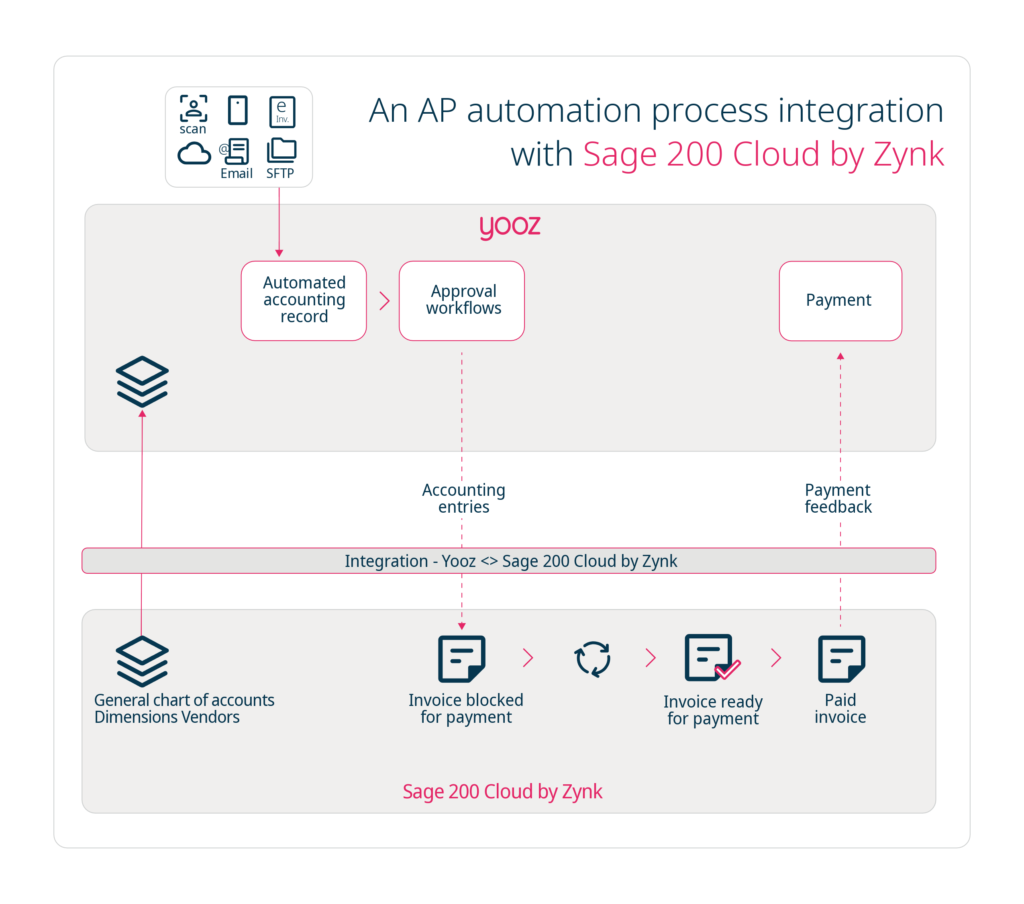
Download the Sage 200 Cloud and Yooz infographic as a PDF
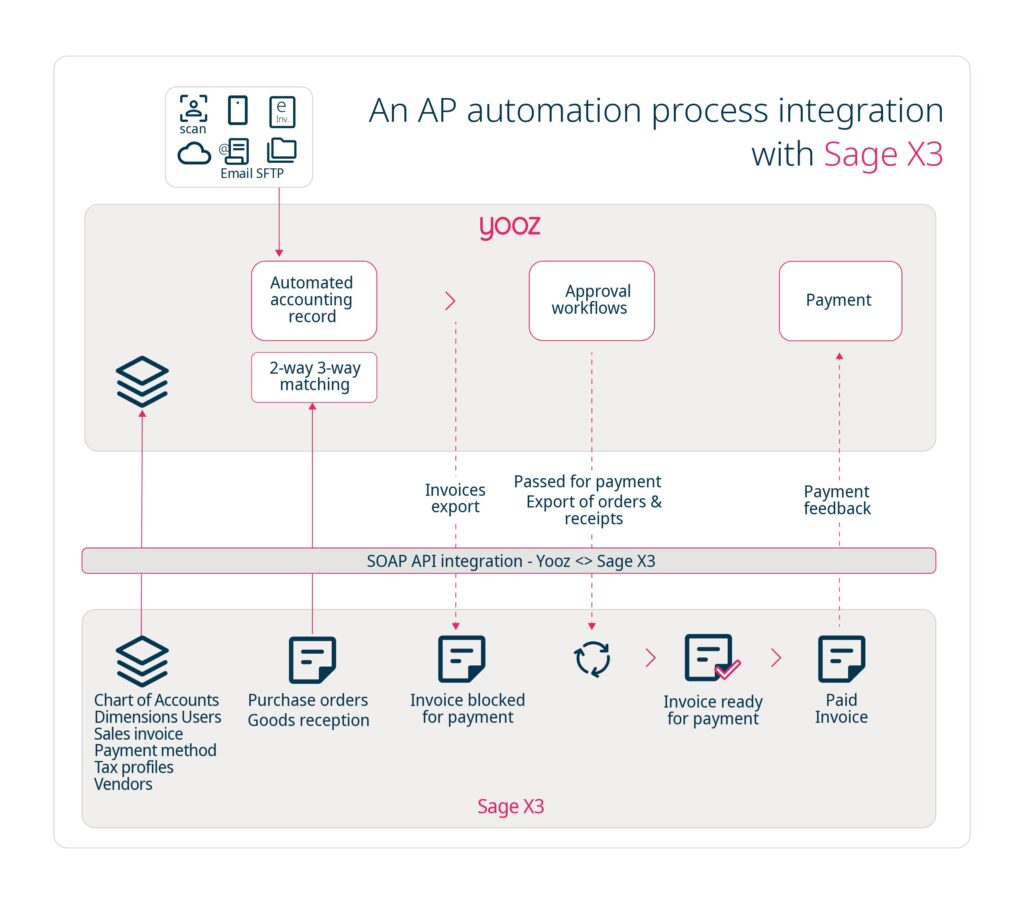
Download the Sage X3 by Deveho and Yooz infographic as a PDF

Download the Sage X3 by Acuity and Yooz infographic as a PDF

Download the Sage Intacct and Yooz infographic as a PDF

Download the Sage 50 and Yooz infographic as a PDF
Download the Sage 200 Professional and Yooz infographic as a PDF
Download the Sage 200 Standard and Yooz infographic as a PDF
Sage Resources




















Blog – Level Up Your Sage 200 Cloud Abilities Using Invoice Automation

Blog – Accounts Payable Automation Using Sage 50

Blog – Effortless Efficiency with Sage Intacct Accounts Payable

Blog – Automating Your Invoices in Sage X3 – Step-by-Step Guide

Webinar Replay – Yooz Purchase-to-Pay Automation + Sage: The most Advanced fraud prevention solution for high-performing finance teams

Webinar Replay – Yooz & Sage Intacct Advanced Accounting Tech to help CFOs thrive in 2026

Webinar Replay – Supercharge Sage Intacct with Yooz, the most powerful AP Automation: how the THE OTHER HOUSE did it!

Webinar Replay – Multiply the capacities of Sage Intacct with Yooz, the most powerful AP Automation

Webinar Replay – Multiply the power of Sage X3: only with Yooz AP Automation

Experience Sage and Yooz: faster, smarter financial operations
FAQ Yooz and Sage
Is the integration between Yooz and Sage native?
Yes. Yooz provides dedicated integrations for Sage Intacct, Sage X3 and Sage 200 Cloud, adapted to each technical environment.
Which Sage versions are supported?
Yooz integrates with: Sage Intacct, Sage X3, Sage 200 Cloud.
Support depends on configuration and connector deployment.
What data is synchronised between Yooz and Sage?
Depending on the environment:
- Chart of accounts
- Dimensions
- Suppliers
- Tax codes
- Purchase orders
- Goods receipts (where applicable)
- Approved accounting entries
- Payment status feedback
How are PO invoices handled?
Yooz performs invoice-to-PO matching.
In environments such as Sage X3 where goods receipts are available, 3-way matching (PO / receipt / invoice) can be supported depending on system configuration.
Can we track the invoice lifecycle?
Yes. Status visibility includes: Received → Under review → Approved → Posted → Paid
Full traceability and reporting are available.
Are accounting entries transferred to Sage?
Yes. Approved invoices generate accounting entries that are transmitted automatically to Sage, according to defined posting rules.
Does Yooz manage approval workflows before export?
Yes. Yooz includes configurable approval workflows to ensure invoices are validated before being posted to Sage.
Explore other ERP integrations

Microsoft MS Dynamics

Oracle NetSuite

SAP

Infor

Acumatica
