



Why connect Microsoft Dynamics to Yooz?
Without integration, invoice processes remain fragmented, manual and difficult to track. Connecting Microsoft Dynamics to Yooz creates a structured, automated flow from invoice receipt to approval, posting and payment tracking.
Key benefits:


How does the integration work?
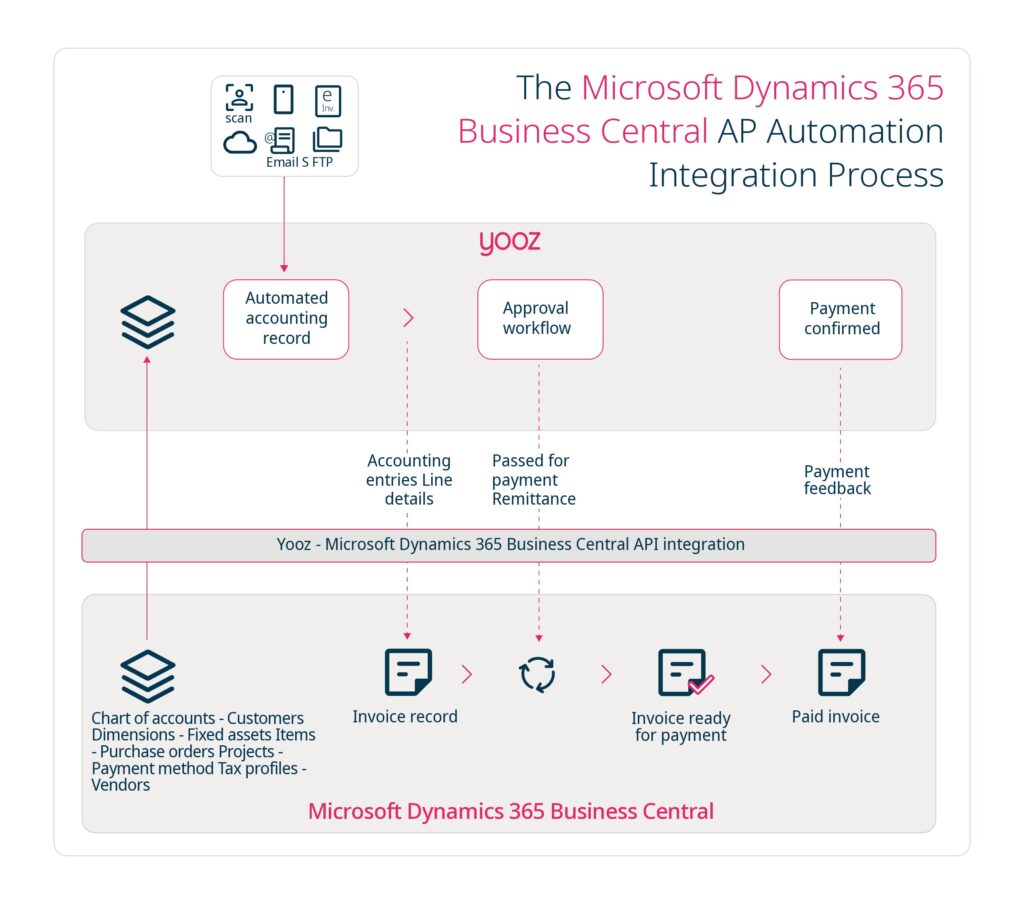
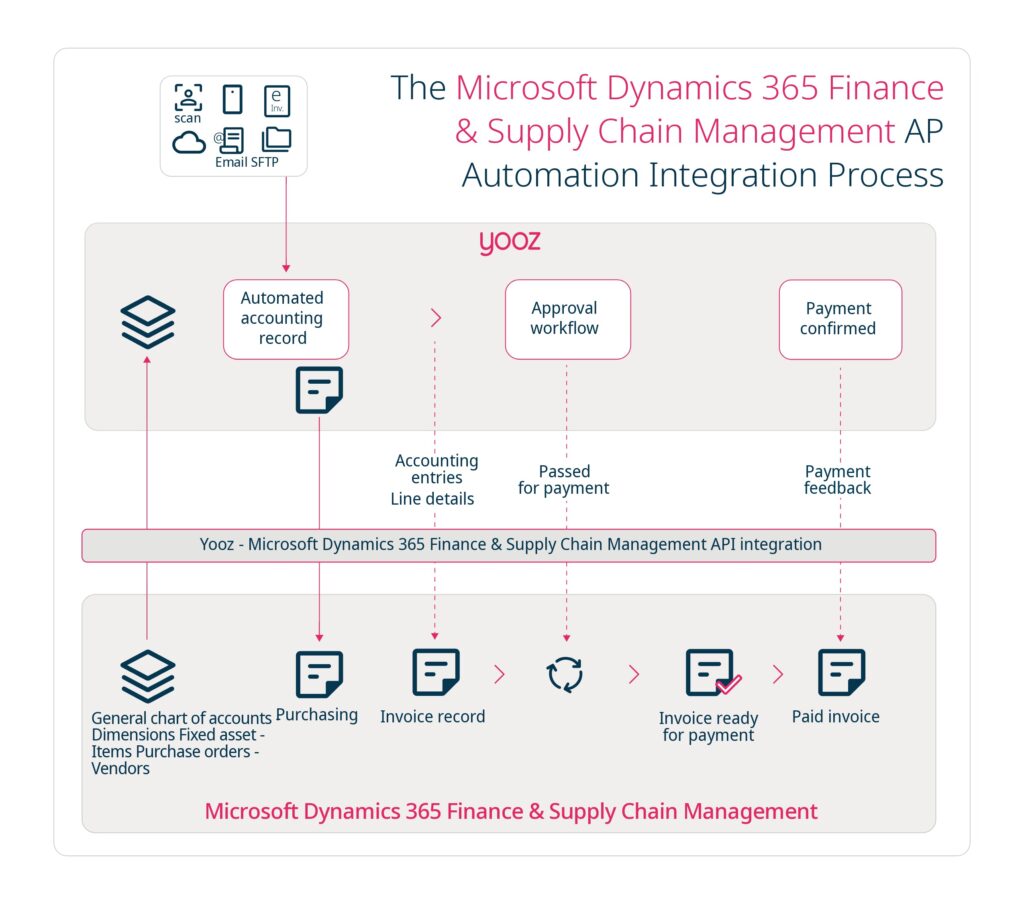
Yooz manages and automates the entire invoice workflow, while Microsoft Dynamics ensures accounting integrity and payment tracking. The integration is driven by clear invoice statuses – blocked, approved for payment, paid – managed through automated exchanges between both systems.
Connectivity & interfaces
Microsoft Dynamics 365 Business Central
The integration relies on API-based connectivity through the Yooz connector to enable structured exchanges of accounting entries, invoice data and master data between Yooz and Microsoft Dynamics 365 Business Central.
Microsoft Dynamics 365 Finance & Supply Chain Management
The integration relies on API-based connectivity to enable automated data exchange between Yooz and Microsoft Dynamics 365 Finance & Supply Chain Management, including the export of validated invoice data, accounting entries and payment status feedback.
Microsoft Dynamics resources




Blog – Microsoft Dynamics 365 Business Central for AP Automation: The Perfect Match

Blog – Streamlining AP Automation with Microsoft Dynamics GP and Yooz

Webinar – Go further with Microsoft and Yooz: Transform your accounting through AI-driven P2P automation

Webinar – The most advanced AI technologies applied to Accounting from Microsoft & Yooz

Webinar – Microsoft, Prodware & Yooz unite to offer the most advanced tech for automating accounting processes
Webinar – The most advanced AI technologies applied to Accounting from Microsoft & Yooz
Automate Supplier Invoices with Yooz and Microsoft Business Central

See how Microsoft Dynamics and Yooz transform financial operations
FAQ Microsoft Dynamics 365 and Yooz
Is the integration between Yooz and Microsoft Dynamics native?
Yes. Yooz offers dedicated integrations with Microsoft Dynamics 365 Business Central and Microsoft Dynamics 365 Finance & Supply Chain Management, using secure API-based connectivity and automated data exchange.
Which Microsoft Dynamics versions are supported?
Yooz integrates with Microsoft Dynamics 365 Business Central and Microsoft Dynamics 365 Finance & Supply Chain Management.
What data is synchronised between Yooz and Microsoft Dynamics?
Master data such as chart of accounts, dimensions, suppliers, tax codes and purchase orders, along with transactional invoice data including accounting entries, approved-for-payment status and payment updates.
How are purchase order invoices handled?
Yooz automatically matches invoices to purchase orders, performs verifications and routes approvals before posting into Microsoft Dynamics.
Can I track the invoice processing status?
Yes. Yooz provides visibility into invoice statuses from ‘blocked’ to ‘approved’ and finally ‘paid’, with updates synchronised from Microsoft Dynamics.
How are the ‘approved for payment’ and payment steps managed?
Yooz sends approved-for-payment information to Microsoft Dynamics and receives payment status feedback so invoice tracking remains up to date.
Are accounting entries transferred to Microsoft Dynamics?
Yes. Once invoices are approved in Yooz, accounting entries are exported automatically to Microsoft Dynamics.
Does Yooz support approval workflows before export to Microsoft Dynamics?
Yes. Configurable approval workflows ensure invoices are reviewed and validated before entries and approved-for-payment statuses are transmitted to Microsoft Dynamics.
Explore other ERP integrations

Sage

Oracle NetSuite

SAP

Infor

Acumatica
