


If you’re researching accounts payable (AP) automation software, you’ve probably noticed that every vendor says the same things: “save time,” “eliminate paper,” “go touchless.” The differences that matter are buried in the details: how invoices are captured, how matching works, whether the tool plugs into your ERP or replaces parts of it, and how long it takes before your team sees a benefit.
This guide is built as an expanded FAQ. Each section answers a question finance teams ask while evaluating invoice management systems, with a clear “what good looks like” and a “red flag” you can use in your own vendor comparison.
Quick answer: A complete AP automation solution should (1) capture invoice data accurately with AI, (2) route approvals automatically, (3) match invoices to POs and receipts, (4) connect natively to your ERP or accounting system, (5) automate vendor payments, and (6) give you real-time visibility, all without forcing you to replace your existing tech stack.
First, what is AP automation, and why do you need it?
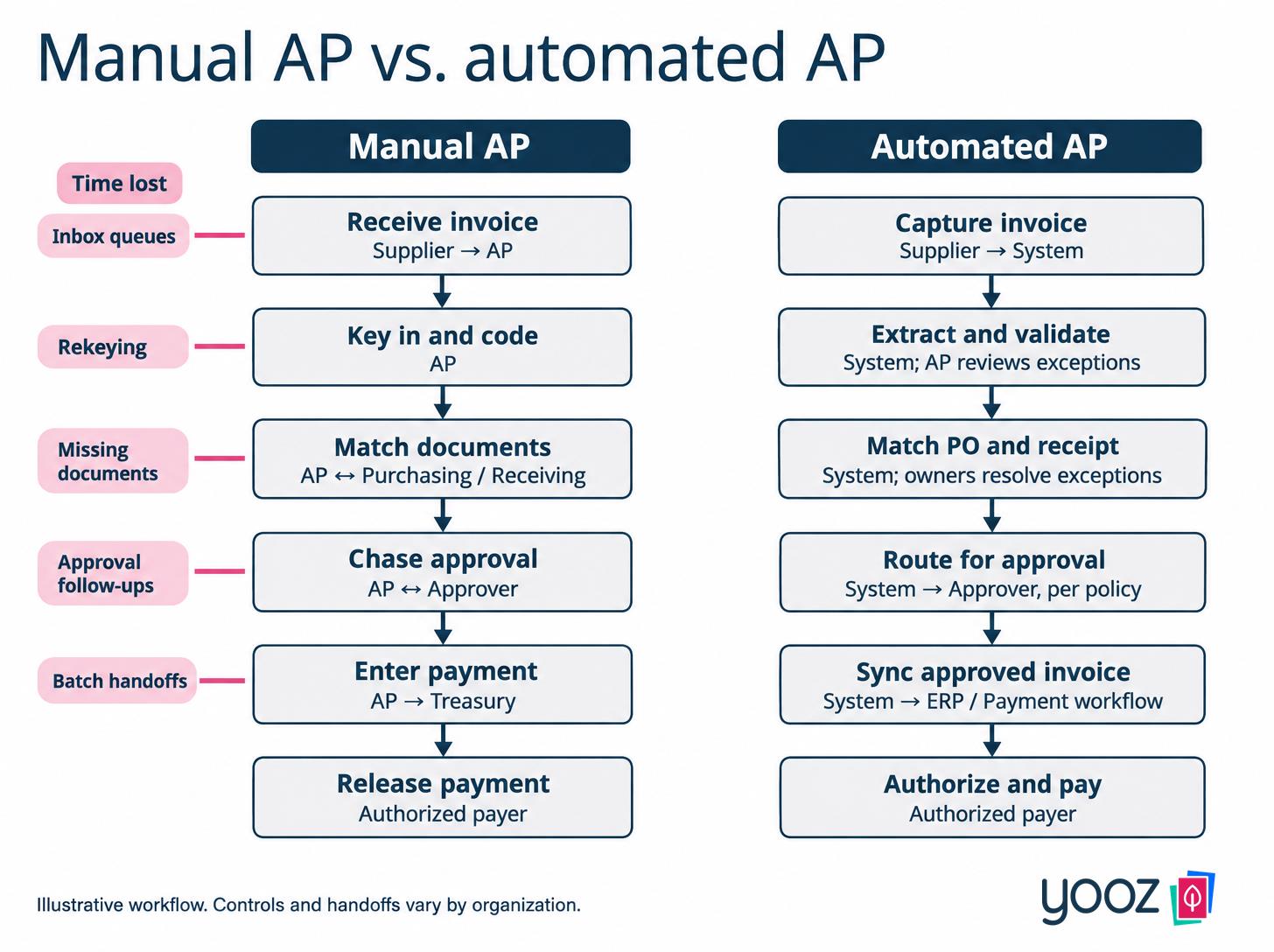
Accounts payable automation software replaces the manual steps between “an invoice arrives” and “the vendor is paid”: opening emails and mail, keying data, coding to the general ledger, chasing approvers, matching to purchase orders, and issuing payment. Done by hand, each of those steps is a chance for delay, duplicate payments, missed early-pay discounts, and errors.
The business case usually comes down to four things:
- Cost. Manual invoice processing is expensive per invoice, and the cost scales linearly with volume.
- Speed. Invoices stall in inboxes and on approvers’ desks. Automation shortens cycle time and makes it predictable.
- Control. Approval trails, duplicate detection, and matching rules reduce fraud and payment errors.
- Capacity. Your team stops being data-entry clerks and starts analyzing spend, managing vendor relationships, and closing the books faster.
The 12-point checklist
1. Accurate, AI-powered invoice capture (not just basic OCR)
Everything downstream depends on clean, accurately captured invoice data. Basic optical character recognition (OCR) reads text, but it doesn’t understand which number is the invoice total, which is the PO, and which is a line-item quantity, so someone still has to fix it.
What good looks like
- Captures invoices from every channel: email, EDI, PDF upload, scanned paper, and supplier portals
- Extracts header and line-item data, with automated invoice data entry that gets better as it learns your vendors
- Shows confidence levels and flags exceptions instead of silently guessing
- Handles non-standard formats, multiple currencies, and multi-page invoices
Red flag: A vendor can’t tell you their field-level accuracy or how much of your volume is truly “no-touch.” Ask for results on your sample invoices, not a polished demo set.
2. Configurable invoice approval workflows
Approvals are where most invoices get stuck. A good invoice approval system routes each invoice to the right person automatically and keeps it moving.
What good looks like
- Rules based on amount, vendor, department, GL account, project, or cost center
- Mobile approvals and email approvals, so approvers don’t have to learn a new tool
- Automatic reminders, escalations, and delegation for vacations
- A full audit trail of who approved what and when
Red flag: Workflows that require a developer or vendor professional services to change. Your org chart will change, and your approval rules should be editable by finance.
3. Automated 2-way and 3-way matching
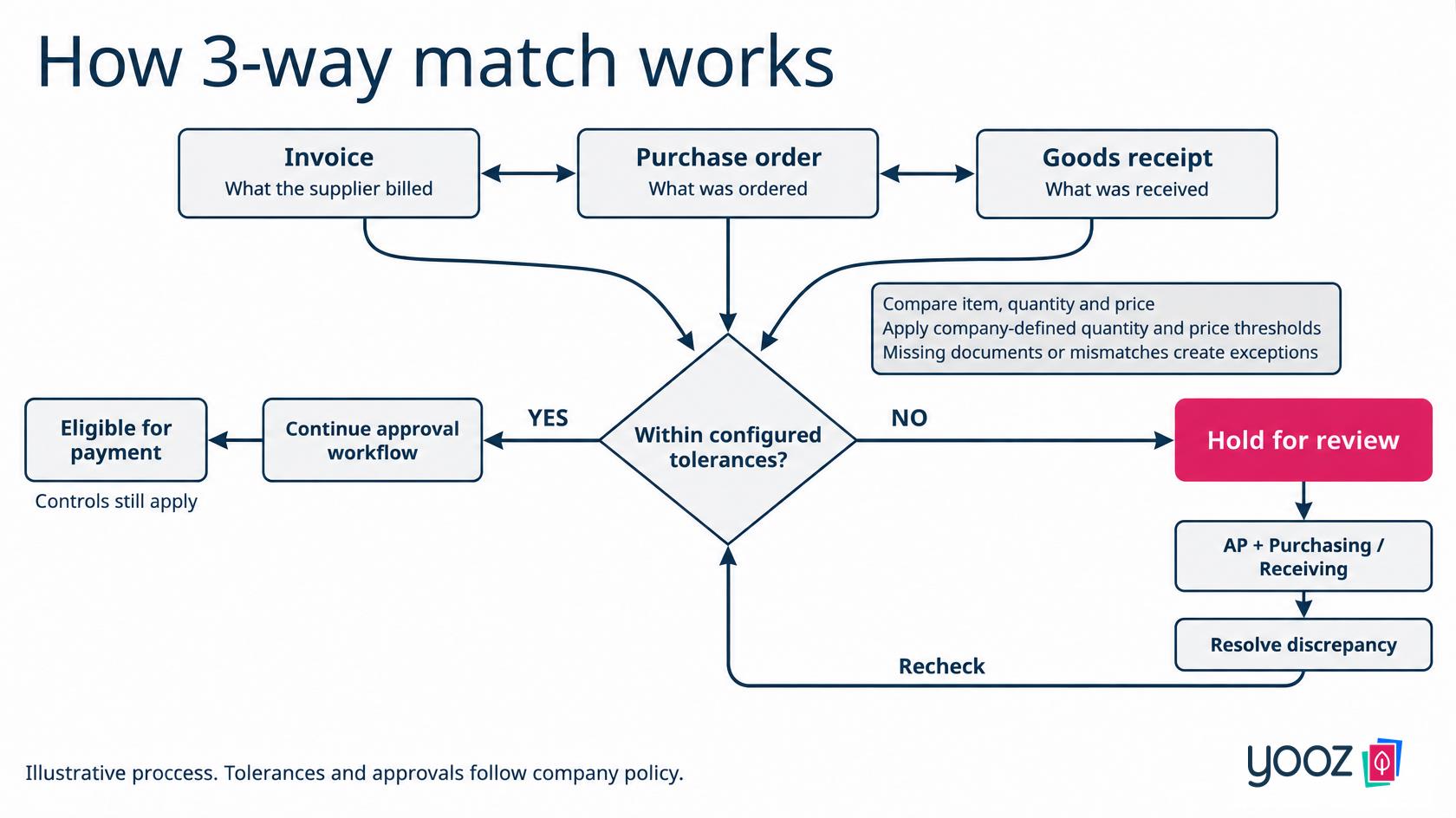
Three-way matching compares the invoice against the purchase order and the receiving record before payment. It’s one of the strongest controls in AP, and one of the most tedious to do manually.
What good looks like
- 2-way, 3-way, and (if relevant) 4-way matching supported
- Line-level matching with configurable tolerances for price and quantity
- Automatic handling of partial deliveries and partial invoices
- Clear exception queues explaining why something didn’t match
Red flag: “Matching” that only works at the invoice-total level, or that requires you to re-key PO data into the AP tool.
4. Native integration with your ERP or accounting system
This is the make-or-break item for most buyers, and it’s why so many searches are system-specific. Your AP tool should provide native ERP integration that syncs vendors, POs, GL accounts, and approved invoices with the system of record, not live in a silo.
What good looks like
- Prebuilt, supported integrations for your platform, for example Sage Intacct, Sage 100, Sage 300, NetSuite, Microsoft Dynamics 365 Business Central, or Epicor Kinetic
- Two-way sync of vendor and PO data, not just a one-way export of invoices
- Real-time or near-real-time updates, with a clear process when a sync fails
- Documented, maintained connectors (ask who maintains it when your ERP releases an update)
Red flag: An integration that’s really a CSV export you upload by hand.
5. Payment automation
Automating invoice entry but still paying by hand leaves value on the table. Look at how the platform handles payment automation after approval.
What good looks like
- Multiple payment methods: ACH, check, virtual card, and international options
- Payment scheduling tied to due dates and early-payment discounts
- Vendor payment status visible to both your team and your suppliers (fewer “where’s my payment?” emails)
- Fraud controls: duplicate detection, bank-detail change verification, and approval limits
Red flag: Payments handled by a third party you can’t see into, or fees that aren’t clear until after signing.
6. Coverage across the full procure-to-pay process
Invoices are the end of the procure-to-pay process, which starts with a request to buy something. If purchasing isn’t connected to AP, you’ll keep reconciling after the fact.
What good looks like
- Purchase requisitions and PO creation with approvals
- Receiving, so matching has something to match against
- One connected record from request → PO → receipt → invoice → payment
Red flag: A tool that does only invoice scanning and leaves you stitching together separate systems for purchasing and payment.
7. Real-time visibility and invoice tracking
If you can’t answer “where is this invoice?” in seconds, you don’t have control, you have a pile. Look for real-time invoice tracking and visibility across statuses, approvers, and exceptions.
What good looks like
- Live invoice tracking by status, approver, and age
- Dashboards for cycle time, exceptions, spend by vendor or category, and accruals
- Searchable archives with the invoice image attached to every transaction
- Reports finance can build without IT
Red flag: Reporting that requires exporting to a spreadsheet to answer basic questions.
8. Fit for your industry
AP isn’t identical everywhere. A general contractor with job costing, retainage, and lien waivers has different needs than a distributor with high-volume PO matching, or a trucking company with fuel and maintenance invoices.
What good looks like
- Support for industry-specific coding (jobs, projects, funds, locations, classes)
- Customer references and case studies in your industry
- Workflows that reflect how your industry actually buys and pays
Industries commonly served by AP automation include automotive, heavy-trucking dealerships, construction and contracting, manufacturing, distribution, healthcare, hospitality, education, nonprofit, and transportation.
Red flag: A vendor whose “industry solutions” page is the same generic page with a different stock photo.
9. Implementation that’s fast and realistic
How complicated is the solution, and how long will it take? The honest answer varies by ERP, volume, and the number of approval rules, so get a specific AP automation implementation plan in writing.
What good looks like
- A defined implementation methodology with named milestones
- Clear split of responsibilities: what the vendor does, what your team does
- Cloud-based deployment, with no servers to buy or maintain
- Training that fits your team’s schedule, plus a go-live support period
Red flag: Timelines that are vague (“it depends”) or a project plan that needs your IT team full-time for months.
10. Pricing transparency and a credible ROI case
The cost of invoice processing is the reason you’re shopping, so make sure the vendor can help you quantify it with a credible pricing and ROI model, and be clear about what their price includes.
What good looks like
- Pricing model you understand (per invoice, per user, tiered, or platform fee) and can forecast as volume grows
- All-in cost: implementation, integrations, support, payment fees, and any extra modules
- An ROI model using your invoice volume, headcount, and error rates
A simple way to estimate savings:
| Input | Example |
|---|---|
| Invoices per month | 1,000 |
| Cost per invoice, manual | $9.12 |
| Cost per invoice, automated | $1.48 |
| Savings per month | $7,500 |
| Savings per year | $90,000 |
Then add the softer returns: early-payment discounts captured, late fees avoided, duplicate payments prevented, and hours redirected to higher-value work.
Red flag: An ROI claim that can’t be traced to your own numbers.
Calculate your potential savings
11. Security, compliance, and cloud reliability
You’re handing a vendor your financial data and your payment workflow. Treat security, compliance, and cloud reliability as requirements, not features.
What good looks like
- Independent security attestations
- Role-based access, single sign-on, and detailed audit logs
- Data encryption in transit and at rest
- Published uptime and disaster recovery commitments
Red flag: Security answers that are “we’ll get back to you” after the demo.
12. Support and a vendor you can rely on
Automation touches a process that must run every day. When something breaks on the last day of the month, you need a person.
What good looks like
- Support reachable by phone, chat, and email, with response-time commitments
- A customer success contact who reviews your results, not just your renewal
- Active product development, particularly in AI, and a transparent roadmap
- Customer references you can call
Red flag: Support available only by ticket, or references that are all “case studies” with no actual people to talk to.
How AP automation solutions compare
Not every “alternative” solves the same problem. Most options fall into a handful of categories:
| Approach | Best for | Typical gaps |
|---|---|---|
| ERP-native AP module | Simple needs, low invoice volume | Limited invoice capture, basic approvals, little automation for matching exceptions |
| Standalone OCR / capture tool | Getting data off the page | Doesn’t handle approvals, matching, or payments; you still manage the rest |
| Payments-first platform | Paying vendors faster or by virtual card | Often thin on invoice capture and PO matching |
| Complete AP / procure-to-pay automation | End-to-end control from request to payment | Needs a good integration with your ERP to deliver full value |
| Outsourced AP services | Teams that want to offload the work | Less visibility and control; ongoing per-invoice fees |
Where Yooz fits
What is Yooz? Yooz is a cloud-based accounts payable and purchase-to-pay automation platform that uses AI to capture invoices, route approvals, match to purchase orders, and prepare payments.
Who is it for? Finance and AP teams at mid-sized organizations that want to move off paper, email, and spreadsheets without replacing their ERP or accounting system.
How does it help finance teams? It reduces manual entry, speeds up approvals, tightens controls, and gives controllers and CFOs real-time visibility into spend and liabilities.
Do I need to replace my existing tech stack? No. Yooz is designed to sit alongside your ERP or accounting system through integrations.

Personalized demo
Discover Yooz, the smartest, most powerful, and easiest-to-use solution!