



Every purchase has the potential to affect budgets, supplier relationships, operational efficiency, and financial compliance. As organizations grow, managing purchases through emails, spreadsheets, or informal approval processes can create bottlenecks, reduce visibility into spending, and make it difficult to enforce procurement policies consistently. Purchase order management ensures purchases are authorized, tracked, and aligned with business objectives.
This is where purchase order management becomes critical. By providing a structured framework for requesting, approving, issuing, and tracking purchases, purchase order management helps organizations control spending, improve vendor accountability, and maintain financial compliance. When the process is poorly designed, businesses face procurement delays, budget overruns, vendor disputes, and increased audit risk.
This guide explains the purchase order management process, explores the four types of purchase orders, highlights best practices, reviews KPIs, and examines how AI-powered tools are transforming PO management.
What Is Purchase Order Management?
Purchase order management is the structured process organizations use to create, approve, track, and close purchase orders. Procurement, finance, and accounts payable teams work together to ensure purchases are authorized, budgets are respected, and transactions are accurately recorded.
The result is greater spend visibility, stronger financial controls, and more reliable reconciliation.
At its core, purchase order management is about controlling how money leaves the organization. Rather than simply generating paperwork, the process establishes accountability, enforces purchasing policies, and creates an auditable record of every approved purchase. Each step exists to verify spending decisions and reduce risk before payment is made.
Purchase Order Management vs. Procurement: Key Distinction
Procurement and purchase order management are closely connected but serve different purposes. Procurement is a strategic function focused on sourcing, vendor selection, contract negotiations, and supplier management. Purchase order management is an operational process that begins once a purchase decision is made and continues through PO creation, approval, tracking, payment, and closure.
The distinction matters because each function has different goals and metrics. Procurement focuses on cost savings and vendor performance, while purchase order management emphasizes speed, accuracy, spend visibility, and compliance. Together, they form critical components of the Procure-to-Pay (P2P) process.
Why PO Management Matters: The Cost of Getting It Wrong
Poor purchase order management can have significant financial and operational consequences.
- Maverick Spend: Purchases made outside approved workflows reduce visibility and control. In organizations without strong controls, maverick spend can account for 20% to 40% of indirect spend.
- Duplicate Orders and Overpayments: A lack of centralized tracking increases the risk of ordering items that are already in transit or paying invoices tied to unauthorized purchases.
- Approval Bottlenecks: Manual routing and approval processes slow procurement cycles, delaying purchases and potentially damaging vendor relationships.
- Compliance and Audit Risk: Retroactive purchase orders bypass budget and authorization controls, creating compliance gaps and increasing the likelihood of audit findings.
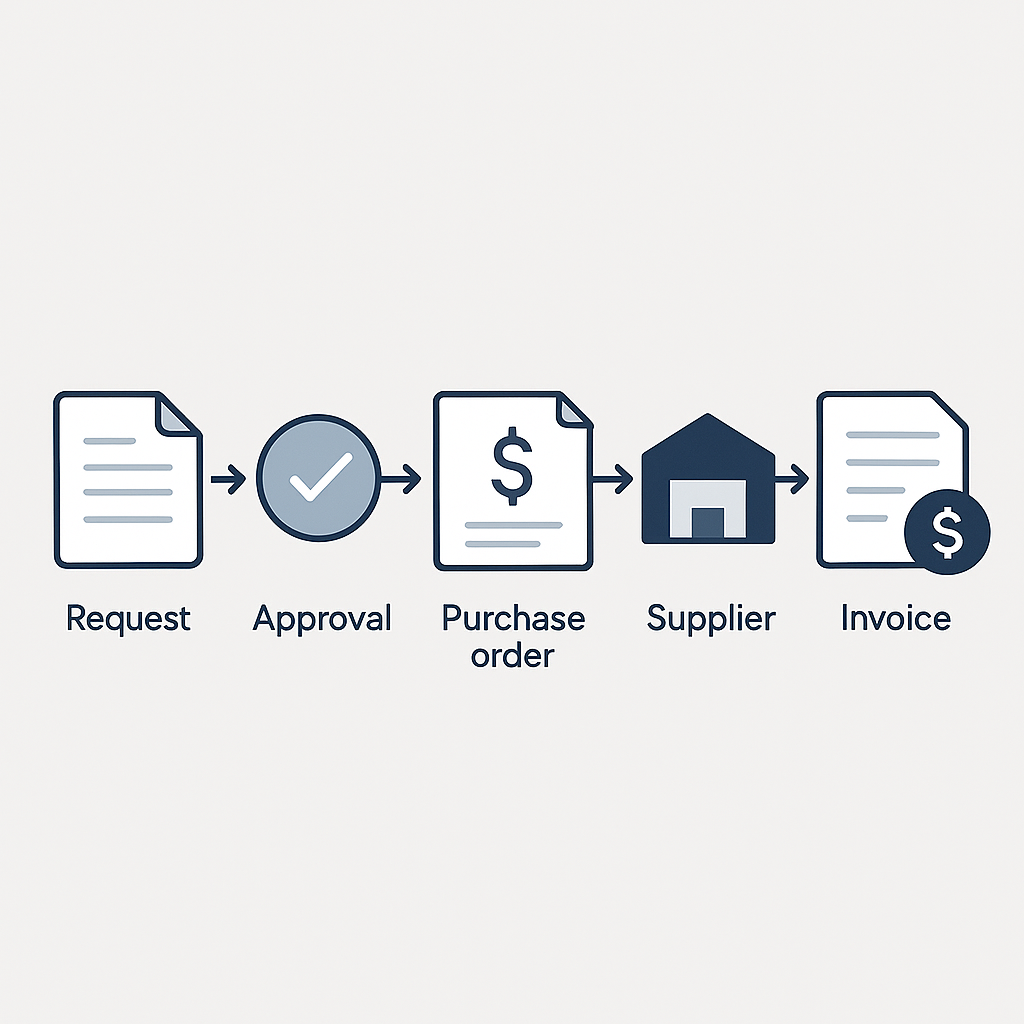
The Purchase Order Management Process: 7 Steps
The purchase order management process follows a defined lifecycle from need identification through payment and closure.
The Purchase Order Workflow
| Step | Stage | Responsible Party | Key Action | Control Enforced |
|---|---|---|---|---|
| 1 | Need identification and purchase requisition | Department or employee | Submits a purchase requisition with item details, quantities, estimated costs, and cost center information | Budget awareness and early spend visibility |
| 2 | Purchase requisition review and approval | Manager, Finance, or Procurement | Reviews the request for budget availability, business need, policy compliance, and approval authority | Authorization and budget control before purchasing |
| 3 | Vendor selection and RFQ | Procurement | Evaluates vendors or selects from approved vendor lists based on pricing, quality, and service requirements | Vendor quality and pricing control |
| 4 | Purchase order creation and issuance | Procurement | Creates and sends the purchase order with pricing, terms, quantities, and delivery requirements | Formal spend authorization and vendor commitment |
| 5 | Order acknowledgment and fulfillment tracking | Procurement and vendor | Confirms PO acceptance and monitors fulfillment and delivery status | Early identification for delivery and fulfilment risks |
| 6 | Goods receipt and three-way matching | Receiving, AP, and Finance | Verifies goods receipt matches the PO, invoice, and receipt records | Overpayment, bill error, and fraud prevention |
| 7 | Invoice processing and payment | Accounts Payable | Approves invoice, issues payment, reconciles records, and closes the PO | Financial accuracy and complete audit trail |
The 4 Types of Purchase Orders
Organizations use different purchase order types depending on how frequently they buy from a vendor, how much is known about the purchase, and the level of contractual commitment required. Choosing the right PO type helps balance control, flexibility, and administrative effort.
| PO Type | Best Used For | Purchase Frequency | Order Specificity | Relationship Duration | Risk Level | Administrative Effort |
|---|---|---|---|---|---|---|
| Standard PO | One-time purchases with known quantities, pricing, and delivery dates | One-time | Full defined | Short-term | Low to Medium | Medium |
| Planned PO | Future purchases where quantities and pricing are known but delivery timing is uncertain | Anticipated | Partially defined | Medium-term | Medium | Medium |
| Blanket PO | Recurring purchases from the same vendor under an established spending limit | Recurring | Repeated purchased | Long-term | Low to Medium | Low once established |
| Contract PO | High-value or long-term vendor relationships requiring formal contractual terms before specific vendors are known | Multiple orders | Framework agreement with details added later | Long-term | High | High upfront |
Quick selection guide on use:
- Standard PO for a defined, one-time purchase
- Planned PO when you need to lock in pricing before delivery timing is finalized
- Blanket PO for recurring purchases from the same vendor
- Contract PO when legal terms must be established before individual orders are placed
Which PO Type Should you Use?
| Consideration | Standard PO | Planned PO | Blanket PO | Contract PO |
|---|---|---|---|---|
| Purchase frequency | One-time only | Anticipated, timing unknown | Recurring, ongoing | Multiple orders under agreed terms |
| Order specificity | Fully defined | Partially defined | Consistent, repeated | Framework agreed, details follow |
| Relationship duration | Short-term | Medium-term | Long-term preferred | Long-term required |
| Value and risk level | Low to medium | Medium | Low to medium | High |
| Administrative effort | Medium | Medium | Low once established | High upfront |
Common Purchase Order Management Mistakes
The most common PO management issues are not technology failures but process failures. Organizations can significantly improve spend control, compliance, and efficiency by addressing the following gaps:
| Mistake | Best Practice |
|---|---|
| Skipping the purchase requisition process | Enforce a requisition-first policy through system controls that prevent PO creation without an approved requisition. When automated PO management software populates PO fields from the approved requisition, the additional step becomes nearly invisible to the user while the control remains intact. |
| Creating purchase orders retroactively | Establish a policy that retroactive PO creation triggers a mandatory exception review with documented justification. Track retroactive PO frequency as a KPI by department. High rates in specific departments indicate either training gaps or process friction that should be addressed at the system level. |
| Using blanket POs without oversight | Every blanket PO must include a defined spending cap and either an expiration date or a mandatory review trigger. Automated alerts when 75 to 80 percent of the cap is reached give the team time to review before the limit is breached rather than after. |
| Failing to perform three-way matching | Make three-way matching between the PO, goods receipt and invoice a required step before payment. Automate matching where possible and flag exceptions for review. This ensures discrepancies are identified and resolved before payment rather than during month-end reconciliation or audit reviews. |
| Applying the same approval path to every purchase | Implement risk-based approval workflows that adapt to purchase value, category, department, budget impact, and policy requirements. Low-risk, routine purchases can follow streamlined approvals, while higher-value or strategic purchases should trigger additional reviews. This approach improves efficiency without sacrificing control. |
| Leaving completed purchase orders open | Build a PO closure step into the payment workflow so that when an invoice is paid and matched, the corresponding PO is automatically flagged for closure. A monthly open PO report reviewed by procurement owners keeps the ledger accurate between automated closures. |
Purchase Order Management Best Practices
High-performing procurement teams consistently apply a core set of practices that improve spend visibility, strengthen controls, reduce processing delays, and support financial compliance.
1. Centralized Purchasing Activity
Centralization provides real time visibility into budget performance, automates audit trails, and ensures consistent purchase order compliance across all departments. It also serves as the foundation for every other best practice on this list, because procurement controls can only be automated when data is centralized in a single, standardized system.
2. Standardized PO Templates and Required Fields
Inconsistent PO formats create friction with vendors and increase the risk of disputes over quantities, pricing, and delivery terms. A standardized PO template with required fields ensures every purchase order includes the information needed for downstream processes, including vendor details, PO number, line items, quantities, unit prices, payment terms, and delivery dates.
Standardization also speeds PO creation by capturing all required information upfront, reducing errors and supporting efficient three-way matching.
3. Build Tiered Approval Workflows with Escalation Rules
A well-designed approval workflow automatically routes purchase orders based on factors such as spend thresholds, department, category, or vendor risk. Automated escalation rules prevent approval bottlenecks by forwarding requests when approvers do not respond within a defined timeframe, while mobile approvals help keep purchasing moving across locations and time zones.
4. Maintain a Verified and Approved Vendor List
An approved vendor list helps control spending by ensuring vendors are vetted before onboarding. The vendor master file should also be reviewed regularly to maintain accurate and up-to-date records. This simple control is one of the most effective ways to prevent vendor impersonation and payment fraud.
5. Fraud Prevention Controls
Embed fraud prevention controls throughout the purchase order lifecycle. Implement segregation of duties, approval limits, and automated three-way matching to prevent unauthorized purchases. Regularly review vendor records, monitor for duplicate payments, and require independent verification of vendor banking changes to reduce fraud risk, strengthen compliance, and protect every stage of the procurement process.
6. Conduct Regular Vendor Reviews
PO management does not end at payment. The data generated throughout the process provides the foundation for vendor scorecards that track delivery performance, order cycle time, invoice discrepancies, and responsiveness.
Regular performance reviews give procurement teams the evidence needed to negotiate better terms, address underperforming vendors, and make more informed sourcing decisions.
7. Reconcile and Close POs Promptly
An open PO report should be reviewed monthly to confirm that all delivered and paid orders are formally closed. Leaving POs open overstates outstanding commitments, distorts budget availability, and makes audit preparation more complex than necessary.
Automated PO management systems can be configured to trigger a closure prompt when a matching invoice is marked as paid, eliminating the need for manual reconciliation.
Purchase Order Management KPIs Every Team Should Track
The KPIs below help procurement and finance teams measure efficiency, compliance, and purchasing performance. Establish a baseline before process changes so improvements can be measured objectively.
At-a-Glance KPI Reference:
| KPI | What It Measures | Formula | Best-in-Class | Manual / Average |
|---|---|---|---|---|
| Order Cycle Time | Speed of the requisition-to-PO process | (Date PO sent) – (Date PR submitted), averaged | <24 hours | Several days without automation |
| PO Accuracy Rate | Percentage of POs accepted without revision | (POs accepted without revision / Total POs) x 100 | Track trend; set internal baseline | Track trend; set internal baseline |
| Maverick Spend % | Spend occurring outside approved procurement processes | (Spend without POs / Total spend) x 100 | <5% | 20–40% |
| Vendor On-Time Delivery Rate | Percentage of orders delivered by the promised date | (POs on time / Total POs delivered) x 100 | Set per vendor and category | Varies by vendor |
| Three-Way Match Rate | Percentage of invoices matched automatically | (Auto-matched invoices / Total invoices) x 100 | >90% | Significantly lower without automation |
Why Each KPI Matters
Order Cycle Time
Measures how long it takes to convert a purchase requisition into a purchase order delivered to the vendor. A long order cycle time signals approval bottlenecks or manual process inefficiency. According to APQC Open Standards Benchmarking, top-performing procurement organizations complete the requisition-to-PO cycle in under 24 hours. Manual environments without structured approval workflows typically require several days for the same transaction.
PO Accuracy Rate
Tracks how often vendors can process a purchase order without requiring corrections. A low accuracy rate signals problems at the PO creation stage: missing fields, incorrect quantities, or pricing discrepancies that require vendor follow-up. High-performing organizations track this rate as an ongoing indicator of template quality and vendor communication accuracy. A rate that consistently requires amendment on more than one in ten POs points to a systemic problem in either the PO creation step or vendor data management.
Maverick Spend Percentage
Measures purchases made outside approved procurement controls. Maverick spend is one of the most overlooked KPIs because it requires active monitoring of purchases that bypass the system entirely. According to CAPS Research, maverick spend can represent 20 to 40% of indirect spend in organizations without strong PO controls. The Chartered Institute of Procurement and Supply estimates that organizations lose up to 16% of negotiated savings through this category of uncontrolled spend. Best-in-class organizations track this KPI actively and target it below 5%.
Supplier On-Time Delivery Rate
Evaluates vendor performance by measuring whether orders arrive as promised. Targets vary by category and contract. Tracking this rate per vendor provides the data foundation for supplier scorecards and gives procurement teams evidence for vendor selection and contract renewal decisions.
Three-Way Match Rate
Measures how many invoices match automatically against purchase orders and receiving records. According to IOFM benchmarks, best-in-class AP teams achieve automatic match rates above 90%. That figure is worth examining closely: a match rate below 60% means more than four in ten invoices require manual handling, which translates directly into AP labor costs, processing delays, and payment disputes. Improving the three-way match rate is not just a procurement KPI. It is a measurable driver of AP efficiency.
Managing Purchase Orders in Excel: What It Can and Cannot Do
Many organizations begin managing purchase orders in Excel. At low volumes and limited complexity, it is a functional starting point.
What Excel Can Handle
Excel-based PO management is adequate for organizations processing fewer than 50 purchase orders per month, operating from a single location, and working with a small, stable vendor base. A well-structured PO tracker can record PO numbers, vendor details, order amounts, approval status, delivery dates, and payment status. At this scale, the administrative overhead of implementing dedicated software may not be justified by the transaction volume.
Where Excel Breaks Down
The limitations of Excel begin to translate into measurable operational costs as volume and complexity increase:
- No real-time visibility: Multiple users cannot work in the same file simultaneously without creating version conflicts.
- No automated approval routing: Approvals must be managed manually through email.
- No three-way matching: Reconciling invoices against PO and goods receipt data requires manual comparison across multiple documents.
- No audit trail: Changes to the spreadsheet are not automatically logged.
- No ERP integration: Data must be manually re-entered into accounting systems.
Organizations processing more than 50 to 100 purchase orders per month, managing multiple departments or locations, or experiencing recurring approval delays and reconciliation errors often find that Excel’s limitations create measurable operational costs. Purpose-built PO management software eliminates many of these inefficiencies while scaling alongside the organization.
Purchase Order Management Software: What to Look For
The right PO management software depends on transaction volume, existing systems, and the specific inefficiencies the organization needs to solve. Key considerations include core functionality, AI capabilities, and whether a dedicated PO solution or a full ERP is the better fit.
Core Features
A modern PO management system should provide:
- Automated requisition-to-PO conversion
- Configurable approval workflows and escalation rules
- Real-time PO status tracking
- Automated three-way matching
- Vendor master file controls
- Open PO reporting and audit trails
- ERP or accounting system integration
- Role-based access controls and fraud prevention safeguards
Yooz’s AP automation software connects PO management directly to invoice processing and payment, creating a seamless workflow from procurement approval through financial settlement.
How AI Is Changing PO Management
AI capabilities in purchase order management have moved past the proof-of-concept stage. In production environments today, AI-powered PO software performs the following functions:
- Intelligent requisition routing: Learns from historical approval patterns and recommends the correct approver automatically.
- Anomaly detection: Flags pricing, vendor, and back information deviations from historical vendor rates before the PO is issued.
- Automated three-way matching: Processes invoice, PO, and goods receipt comparisons without human intervention and escalates only genuine exceptions.
- Predictive reorder suggestions: Uses inventory levels and historical usage patterns to prompt procurement before stock is depleted.
- Natural language interfaces: Allow users to submit purchase requests through conversational prompts rather than structured forms.
The biggest operational impact is often in three-way matching, where AI eliminates much of the manual document comparison previously required by AP teams.
PO Management Software vs. Full ERP
The right approach typically falls into one of three scenarios:
- No ERP, moderate complexity. Start with dedicated PO management software integrated with your accounting system. Implementation is faster and less costly than a full ERP deployment.
- ERP with limited procurement capabilities. Add a specialized PO management solution to strengthen approvals, controls, and matching automation.
- Modern ERP with strong procurement modules. Optimize existing functionality before adding another platform. Additional software may introduce unnecessary complexity.
For AP-focused organizations, the most important consideration is how well PO management integrates with invoice processing and three-way matching, where procurement and accounts payable converge.
The full list of compatible platforms is available on the Yooz ERP integrations page.
How Yooz Supports Purchase Order Management
Purchase order management controls spend before a purchase is made. Accounts payable manages payment after the fact. When these functions operate in separate systems, three-way matching becomes manual, exceptions take longer to resolve, and processing delays increase.
Yooz brings procurement and AP together in a single workflow with automated three-way matching, configurable approval routing, AI-powered invoice capture, real-time reporting, and seamless integration with more than 250 ERP and accounting systems.
Having processed more than 300 million invoices for 7,000+ customers across 50+ countries, Yooz helps organizations reduce manual work, improve visibility, and accelerate the purchase-to-payment cycle. Request a demo to see the complete workflow in action.
Purchase Order Management FAQs
What is purchase order management?
Purchase order management is the process of creating, approving, tracking, reconciling, and closing purchase orders while maintaining spend control and compliance.
What are the 4 types of purchase orders?
The four main types of purchase orders are standard, planned, blanket, and contract purchase orders.
What are common PO mistakes to avoid?
Common mistakes include bypassing requisitions, creating retroactive POs, skipping three-way matching, poorly managed blanket POs, approval bottlenecks, and leaving POs open after payment.
What are the 7 steps of the purchasing process?
The seven steps are requisition, approval, vendor selection, PO creation, fulfillment tracking, goods receipt and three-way matching, and payment processing.
What is a blanket purchase order and when should you use one?
A blanket purchase order is a long-term agreement used for recurring purchases from the same vendor over a defined period.
What is three-way matching in purchase order management?
Three-way matching compares the invoice, purchase order, and goods receipt before payment is approved, helping prevent overpayments, duplicate payments, and fraud.
Additional Resources





Understanding the Purchase Order Process Flow